Au3Forums






AutoIt Tutorial: WebDriver
Your entry into the "au3WebDriver" project
| Introduction | Project structure |
| Au3WebDriver | Dependencies | Setup |
| Selectors | Some use cases | Possible preview |
➀ Introduction
Legend
| Symbol | Description |
|---|---|
| 🔊 | Audio commentary |
| 📑 | Subchapter |
| 🖼 | Screenshot |
| 🎲 | Shortcut: Setup code snippets (for lazy ones) |
| 👨💻 | Code snippets |
| 🔮 | Test: Current code state |
🔊 Welcome
📑 Who is this tutorial for
If you already feel comfortable with AutoIt, but haven’t had any contact with the WebDriver or the au3WebDriver project, you’ve come to the right place. Maybe you’ve ever wanted to start with the WebDriver and you were not sure how to start, although there is the documentation, the start seems to be just too complex at first glance? Then let this practical tutorial support you and let us get the first hurdles out of the way together.
Are you still unsure? Then ask yourself if you’ve worked with the IE.au3 UDF in the past; whether you wanted/needed to automate a browser or websites in any way; whether you wanted to extract source code or parts of the pages for further processing of the information later; whether you, for example, did not get the result that you were hoping for with InetGet()? Then this tutorial is worth your time. Even if you will most likely not get all the answers to your specific use cases, this tutorial opens up new possibilities for you with regard to these or other questions in the WEB area.
If none of this applies to you so far and you are just interested in what it is about, then also to you: have fun.
I recommend this tutorial to users with Level B1 and up. However, the level table is only for orientation and represents a classification aid, so don’t be discouraged and just dare.
📊 Level table (context AutoIt)
| Level | Designation | Description |
|---|---|---|
| A1 | Beginner | Started with AutoIt and its concepts |
| A2 | Users with basic knowledge | Wrote first scripts (mostly with support) |
| B1 | Advanced user | Can deal with first problems independently |
| B2 | Experienced user | Can develop more complex programs |
| C1 | Skilled user | Can apply his broad AutoIt knowledge in areas like backend, frontend, API |
| C2 | Expert | Can use his broad AutoIt knowledge and pass it on in a well-founded way |
📑 What you can expect
In this tutorial, I will cover the following key areas, among others:
- Short explanation of the W3C WebDriver specification.
- Creation of a flexible project structure.
- How do you use the au3WebDriver project (including dependencies) for yourself.
- WebDriver options and features.
- Build and use XPath selectors.
- Some use cases such as navigation, interaction with elements, usage of the browser headless mode and more.
- How to deal with multiple browser tabs.
- Getting page source code.
- Page Object Model for less redundancy, more structure and overview.
I will not address the following key areas in this tutorial:
- What is CDP (Chrome DevTools Protocol) and how to deal with.
- Helper tools like SelectorsHub (to simplify XPath selector creation).
- How to connect to a running browser instance.
- How to keep the WebDriver environment up-to-date (the automated way).
- Troubleshooting of common issues.
In the chapter Possible preview you will find further topics that may be covered in following tutorials.
📑 What should you know and be able to do afterwards
After the tutorial, the setup, the integration of the WebDriver into your own project and the use of the au3WebDriver project should work for you. You will know what to look for to implement the first simple use cases. Furthermore you will know where you can find more information and how you can get more possibilities by using the demo (wd_demo.au3).
📑 What is WebDriver
I really want to simplify the W3C WebDriver Specification down to a understandable level without further explanation or description about the wire protocol and their communication respectively transfer way (by requests and responses). In the section below References for more details you will find the official specification and the accurate definition of WebDriver. Also the architecture of the wire protocol is not that important for this practical tutorial. However, some sentences further below give a little insight.
🏷 In view sentenses: WebDriver is a client-server protocol that allows you to automate web browsers. Clients send requests, the server interprets them according to the wire protocol and then performs the automation behaviors as defined by the implementation steps in the specification. The WebDriver specification allows you, based on defined endpoints (and their inputs and outputs), to implement so-called client libraries in different programming languages and platforms independently, in order to control the behavior of the browser (automate the browser).
🏷 Basic structure (architecture): A WebDriver session which state is maintained across requests by a “session id” token is shared by the server and client. Creating a new session involves sending parameters in the form of capabilities, which tell the server what you want to automate and under which conditions. The server prepares the appropriate browser with any modifications as specified in the capabilities, and the session is then on going. Automation commands and responses are sent back and forth (bound on the session id), until the client sends a request to delete the session, at which point the browser and other resources are quit or cleaned up and the session id is discarded.
🏷 What does this mean for AutoIt: It’s possible to create such a client library which can also be called a wrapper for API calls (or in AutoIt slang as “UDF”). This can be used to control browser behavior along the specification/endpoints, or to automate the browser. This is exactly what the UDF/project “au3WebDriver” does.
📑 What is the au3WebDriver project
It’s basically a client library or a layer above the WebDriver specification (a wrapper) in AutoIt which allows you to interact with any browser that supports the W3C WebDriver specification. Au3WebDriver provides a simplified way to call the different API endpoints of the specification by using specific wrapper functions that represents and capsulate the endpoints. All by one code base which means you configure your preferred browser by setting options/capabilities. Then you can start to interact with the browser or with page elements.
You might heard about Selenium which is the most popular framework to automate browsers and which uses the WebDriver API. Fortunately, with au3WebDriver we have a framework in AutoIt too. If you are interested in other languages, here are just a few once which are WebDriver based.
- Selenium (for multiple languages)
- WebdriverIO (for multiple languages)
- Karate (for Java)
- Nightwatch.js (JavaScript)
- au3WebDriver (AutoIt)
📑 References for more details
References:
| References | Description | |
|---|---|---|
 |
W3C WebDriver | Official W3C WebDriver specification. |
| 📚 | WebDriver Wiki | Further information about this UDF/project (big picture, capabilities, troubleshooting etc.). |
| 📚 | WebDriver discussion threads | See the “References” section in the wiki which lists the relevant forum threads about the WebDriver. |
| 📖 | au3WebDriver.chm | Function CHM help file that comes with this UDF download. |
| 🧾 | Endpoints | List of all endpoints and their usages. |
| 👁 | Demo/examples | In the wd_demo.au3 you will find several examples how to use functions of the au3WebDriver UDF. |
Downloads:
| Downloads | Description | |
|---|---|---|
 |
Chrome | ChromeDriver download from official area. |
 |
Edge | MSEdgeDriver download from official area. |
 |
Firefox | GeckoDriver download from latest release. |
 |
Opera | OperaDriver download from latest release. |
🔊 Short summary, chapter ➀
➁ Project structure
🔊 The charm of the structure
📑 Basic structure
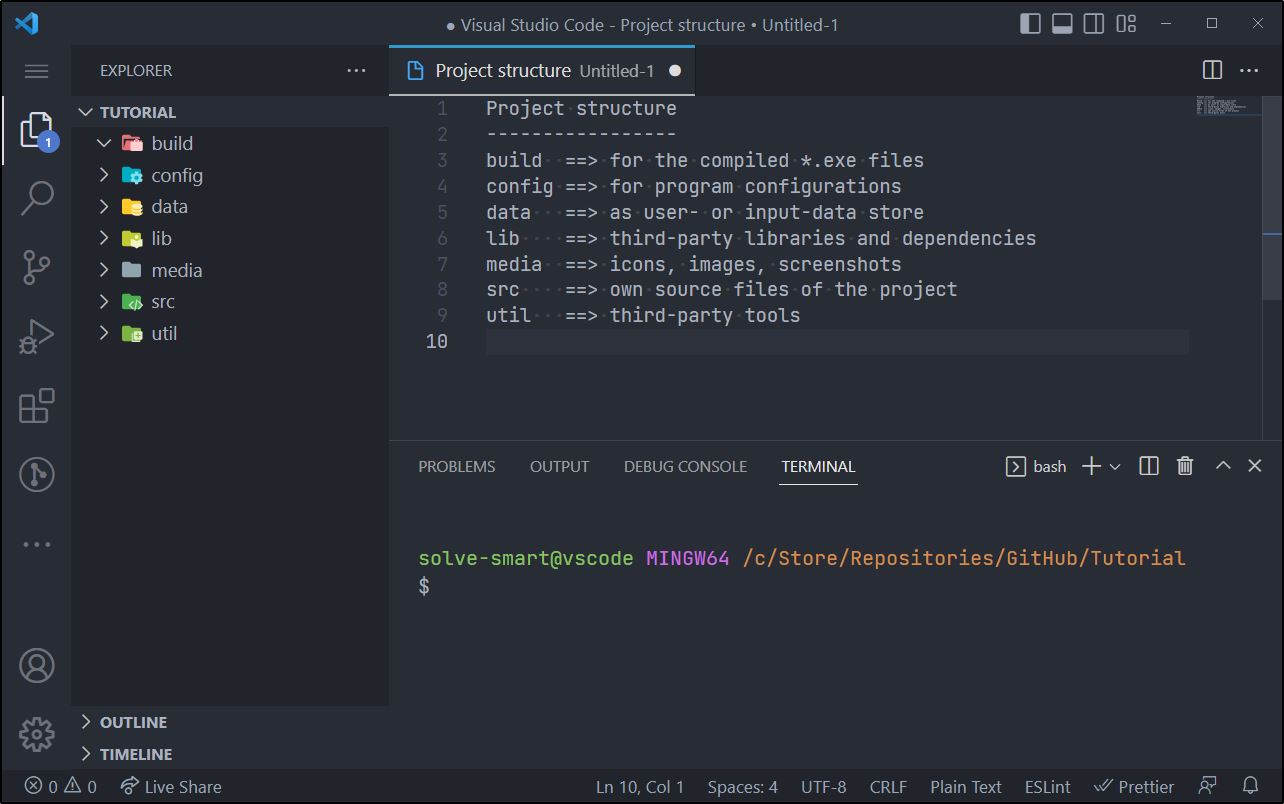
First, we create the project folder which is called Tutorial in this example. This folder gets the following seven subfolders.
🖼 Project folders
Now the folders lib and util get subfolders.
🖼 Subfolders
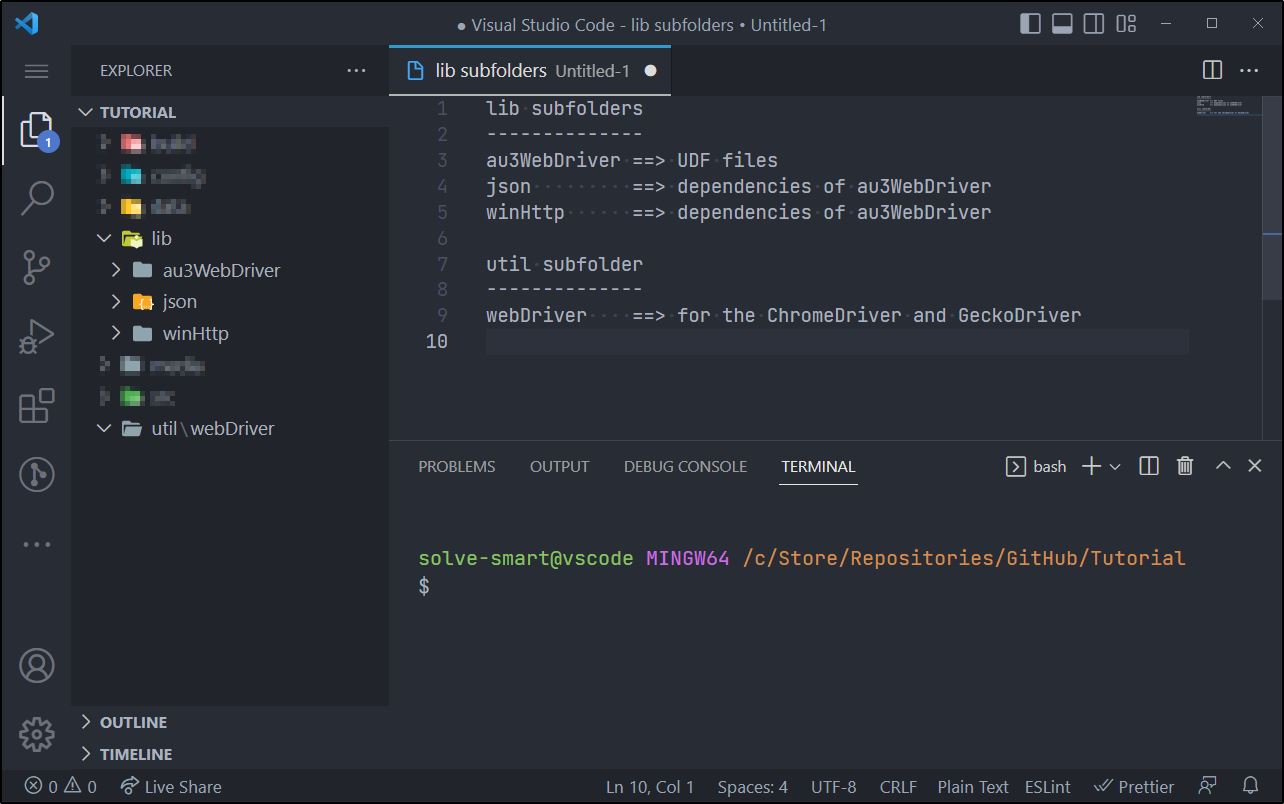
Even though we will only deal with the directories lib, src and util at the beginning, this division helps to assign your code and data into categories early on and thus to think in terms of modules. This helps you keep track of the project and files as they grow more and more.
🎲 Shortcut: To make this a little easier for you, here is a code snippet so you can quickly create the structure. Either you just run the code and the project named “Tutorial” will be created on your desktop or you call the function _SetupProjectStructure() with an arbitrary path.
_SetupProjectStructure()

Func _SetupProjectStructure($sRootPath = @DesktopDir)
    Local Const $sProject     = 'Tutorial'
    Local Const $sProjectPath = _AddTrailingBackslash($sRootPath) & _AddTrailingBackslash($sProject)

    Local Const $aFolderList[] = _
        [ _
            'build', _
            'config', _
            'data', _
            'lib', _
            'lib\au3WebDriver', _
            'lib\json', _
            'lib\winHttp', _
            'media', _
            'src', _
            'util', _
            'util\webDriver' _
        ]

    For $sFolder In $aFolderList
        DirCreate($sProjectPath & $sFolder)
    Next
EndFunc

Func _AddTrailingBackslash($sPath)
    Return (StringRight($sPath, 1) == '\') ? $sPath : $sPath & '\'
EndFunc
📑 Modularization
What is meant by modularization here is nothing more than a division of code into specific files, instead of having everything in one file. The division takes place according to the tasks respectively responsibility of the code. This is for clarity, comprehensibility, combinability and other properties that are pursued in the software architecture or design.
We create the following five *.au3 files in the src folder.
🖼 Initial files
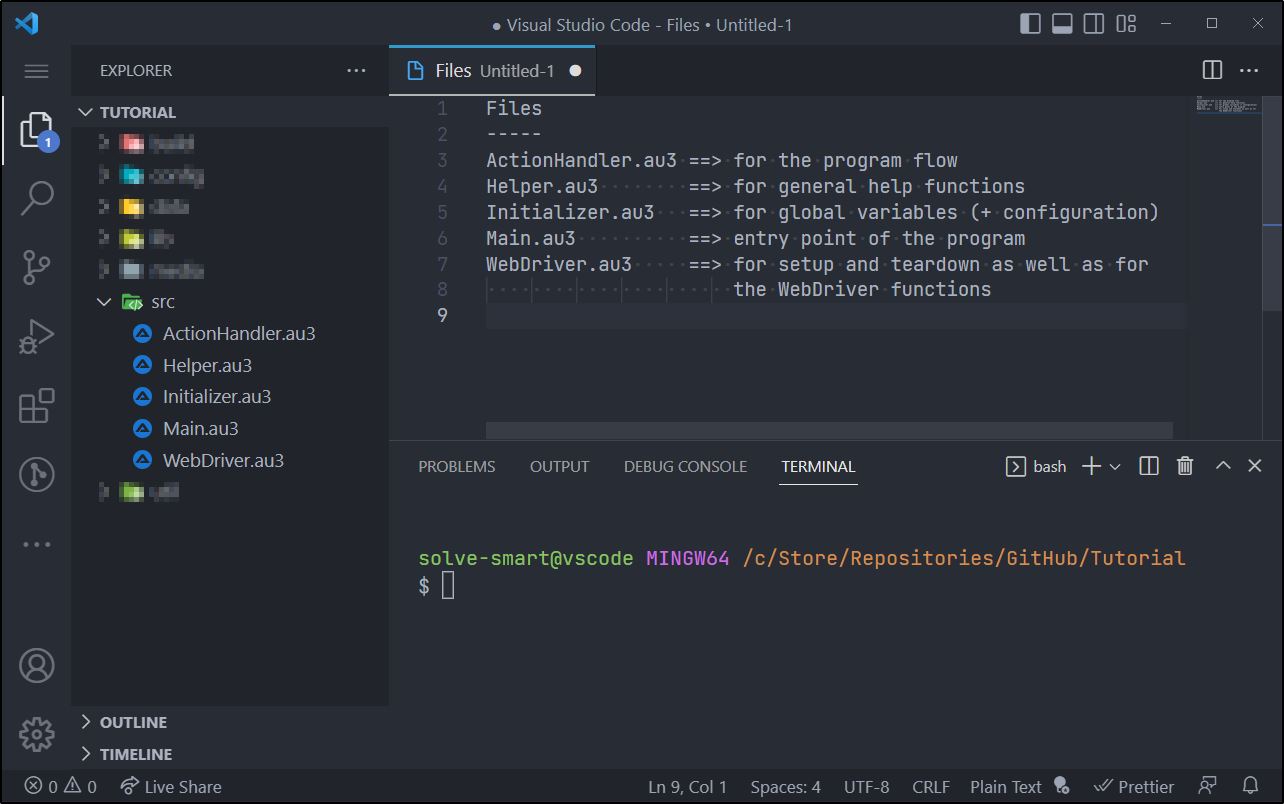
Each of these five files has its own task respectively responsibility and initially serves as the basic structure for the soon following code.
🎲 Shortcut: Assuming you used the before suggested folder structure, you can create the files in the source folder simply by this code snippet.
_CreateInitialFilesInSourceFolder()

Func _CreateInitialFilesInSourceFolder($sRootPath = @DesktopDir)
    Local Const $sProject     = 'Tutorial'
    Local Const $sProjectPath = _AddTrailingBackslash($sRootPath) & _AddTrailingBackslash($sProject)

    Local Const $aFileList[] = _
        [ _
            'src\ActionHandler.au3', _
            'src\Helper.au3', _
            'src\Initializer.au3', _
            'src\Main.au3', _
            'src\WebDriver.au3' _
        ]

    For $sFile In $aFileList
        _WriteFile($sProjectPath & $sFile, '')
    Next
EndFunc

Func _AddTrailingBackslash($sPath)
    Return (StringRight($sPath, 1) == '\') ? $sPath : $sPath & '\'
EndFunc

Func _WriteFile($sFile, $sText)
    Local Const $iUtf8WithoutBomAndOverwriteCreationMode = 256 + 2 + 8

    Local $hFile = FileOpen($sFile, $iUtf8WithoutBomAndOverwriteCreationMode)
    FileWrite($hFile, $sText)
    FileClose($hFile)
EndFunc
👨💻 We start with our Main.au3 file which is the entry point of the (browser automation) program. Let’s create small sections which will be filled with content and context step by step.
Main.au3
#AutoIt3Wrapper_AU3Check_Parameters=-d -w 1 -w 2 -w 3 -w 4 -w 5 -w 6 -w 7
#AutoIt3Wrapper_AU3Check_Stop_OnWarning=y
#AutoIt3Wrapper_Run_Au3Stripper=y
#AutoIt3Wrapper_UseUpx=n
#Au3Stripper_Parameters=/sf /sv /mo /rm /rsln


; autoit options ---------------------------------------------------------------
Opt('MustDeclareVars', 1)


; includes ---------------------------------------------------------------------
#include-once


; modules ----------------------------------------------------------------------


; processing -------------------------------------------------------------------
👨💻 Now we include the first “modules” and call our first function _Actions(), which we create in ActionHandler.au3 (where the program flow is controlled).
Main.au3
; modules ----------------------------------------------------------------------
#include "Initializer.au3"
#include "ActionHandler.au3"
#include "WebDriver.au3"
#include "Helper.au3"


; processing -------------------------------------------------------------------
_Actions()
ActionHandler.au3
Func _Actions()
    ; do something
EndFunc
🔮 Test: AutoIt syntax check
With the “Au3Check” [CTRL] + [F5] (starting from Main.au3) the project shouldn’t have/list any errors.
🖼 ... TODO ...
<img src="./media/images/...jpg" alt="... class="d-block rounded-bottom-2 width-fit">As already mentioned above, we will gradually fill the modules (*.au3 files) with life. So far we have only made sure that we can classify future code in the right place. Of course there will be further abstractions and we will create further modules, which we will then also include in Main.au3 using #include "NewModuleFile.au3".
📑 Optional: Usage of GIT
Optio quam officiis totam est ipsam. Quia vitae dicta. Beatae maiores soluta perferendis facere debitis velit reiciendis eum.
🔊 Short summary, chapter ➁
…
➂ Au3WebDriver
🔊 …
…
📑 The project repository
Accusamus laboriosam earum voluptate molestiae et reprehenderit. Qui doloremque labore laudantium magnam voluptas porro quam cumque dolores. Quis aut nobis consectetur velit quod nisi sed expedita.
📑 Functionality
Voluptas corporis aut. Consequatur quia alias consectetur recusandae reiciendis eos dolorum tempora. Similique rerum commodi commodi nulla eos non unde. Eius rerum ipsam repellat earum non sint qui ea qui. Nemo architecto tenetur necessitatibus.
🔊 Short summary, chapter ➂
…
➃ Dependencies
🔊 …
…
📑 Json UDF
Excepturi deserunt cumque in. Nisi minus et totam ut cumque eos omnis. Natus eius aliquam aliquid. Odit enim accusamus beatae sunt ut velit. Eligendi ut maxime. Deserunt voluptates sint hic voluptatem velit.
📑 ChromeDriver and GeckoDriver
Veniam qui voluptas dolor non consectetur qui blanditiis nam. Veniam sed inventore fugit earum. Consequatur voluptatibus et molestias doloribus.
📑 WinHttp UDF
Et et error non. Quaerat aut voluptas officia officia quis. Aliquam aut tenetur aut deserunt similique quas iure. Reiciendis qui nostrum sint est eos assumenda occaecati. Illum nihil mollitia atque odio.
🔊 Short summary, chapter ➃
…
➄ Setup
🔊 …
…
📑 Set log level
Quisquam labore molestias natus dolores porro tenetur. Et molestiae corrupti nam at optio et tempora dolores illum. Et saepe ut. Illo voluptatum voluptatem expedita rerum natus cupiditate. Illo doloremque architecto quia nihil. Eos odio culpa quae et laboriosam ea sint sequi illo.
📑 Set driver options
Magni enim incidunt ut non exercitationem. Est est non vero error dolor sint eligendi magni voluptatem. Est iste consequatur nobis quisquam pariatur reiciendis perspiciatis quis officia. Qui recusandae consequatur quod. Neque labore doloribus quis et occaecati voluptas laborum. Eius consequuntur veniam.
📑 Set driver capabilities
Quam quod id libero. Corrupti consequuntur tenetur aut vero laudantium doloribus incidunt. Et et sint omnis molestias nihil ut. Et ipsum earum quae labore ipsa aperiam facere harum.
📑 Start and teardown
Ratione consequatur magnam distinctio sapiente vel tenetur. Aperiam sed saepe molestias. Et soluta quidem tenetur qui eum in accusantium. Adipisci qui sapiente.
📑 Test: First run
Ratione consequatur magnam distinctio sapiente vel tenetur. Aperiam sed saepe molestias. Et soluta quidem tenetur qui eum in accusantium. Adipisci qui sapiente.
🔊 Short summary, chapter ➄
…
➅ Selectors
🔊 …
…
📑 Locator strategies
Qui odio recusandae corrupti aut itaque nihil non commodi odit. Nesciunt dolores distinctio. Provident repudiandae eos maxime dignissimos distinctio explicabo eos optio ullam. Ad nihil voluptas. Distinctio autem error ad animi qui. Architecto aperiam culpa voluptatem.
📑 XPath
Praesentium aut repudiandae deleniti quibusdam qui dicta. Et laboriosam animi quisquam ea officia est. Perferendis optio qui omnis quos ad quas similique velit ipsam. Est non expedita. Nisi eligendi nobis quaerat reiciendis.
📑 Browser DevTools
Qui repellendus reprehenderit. Molestias qui sunt dolor consectetur. Consequuntur eum molestias facilis magnam est quis ipsa fugiat.
🔊 Short summary, chapter ➅
…
➆ Some use cases
🔊 …
…
📑 Navigation
Soluta quaerat in inventore nam facilis nostrum. Sunt a voluptates esse neque. Sequi cum magnam beatae perspiciatis quia sunt. Aspernatur dolorem enim molestiae in veniam ullam accusamus.
📑 Find and click elements
Ipsa ut fuga culpa illo doloribus est eaque quo et. Porro dicta similique aliquid sunt laudantium qui quis quaerat. Quo possimus iure aut minus veniam eos. Sit et aut nesciunt numquam.
📑 Fill input fields
Qui et ab impedit qui ipsam omnis numquam. Officiis doloribus id. Aliquid voluptatem facere consequuntur omnis corrupti ducimus atque. Ea qui eaque. Voluptates aut quidem commodi quibusdam sapiente quasi. Voluptatem tempora sed temporibus nam cumque totam ratione enim.
📑 Find multiple elements
Deleniti omnis velit nihil deserunt ipsam sed eos et accusantium. Quod quam fuga et molestiae fugiat. Quibusdam in perspiciatis corrupti non praesentium aliquam quo id et.
📑 Wait for elements
Atque reprehenderit quidem rerum accusantium ullam neque incidunt illo animi. Ipsam doloremque voluptas tempora. Id velit nulla veniam. Ratione accusantium rerum eum. Voluptas doloribus sed dolorum nostrum.
📑 Get element text
Deleniti omnis velit nihil deserunt ipsam sed eos et accusantium. Quod quam fuga et molestiae fugiat. Quibusdam in perspiciatis corrupti non praesentium aliquam quo id et.
📑 Get texts of multiple elements
Deleniti omnis velit nihil deserunt ipsam sed eos et accusantium. Quod quam fuga et molestiae fugiat. Quibusdam in perspiciatis corrupti non praesentium aliquam quo id et.
📑 Get value of attribute
Deleniti omnis velit nihil deserunt ipsam sed eos et accusantium. Quod quam fuga et molestiae fugiat. Quibusdam in perspiciatis corrupti non praesentium aliquam quo id et.
📑 Deal with multiple browser tabs
Deleniti omnis velit nihil deserunt ipsam sed eos et accusantium. Quod quam fuga et molestiae fugiat. Quibusdam in perspiciatis corrupti non praesentium aliquam quo id et.
📑 Run browser in headless mode
Maiores eveniet delectus eum harum et laudantium. Nihil rerum id natus laudantium dignissimos hic animi quae. Est esse consequatur officiis molestiae nulla. Aliquam at aut necessitatibus tenetur.
📑 Get page source code
Quia ut inventore. Id veniam totam dolor quas. Est sunt perspiciatis.
📑 Optional: Usage of POM (page object model)
Porro reiciendis architecto quisquam sit.
🔊 Short summary, chapter ➆
…
➇ Possible preview
🔊 …
…
📑 AAA
Incidunt at occaecati quod accusantium. Quia quos culpa atque explicabo in autem in. Harum earum nobis sunt eos incidunt non. Maxime voluptas earum deleniti illo adipisci. Autem ipsum consequuntur voluptatem et debitis ratione id incidunt.
📑 BBB
Dolorem repellat est soluta autem enim. Natus nemo et sint non dignissimos tempora ut. Natus qui iusto dignissimos ex recusandae distinctio aliquid ut illum. Nulla necessitatibus enim corporis et doloribus rerum.
🔊 Short summary, chapter ➇
…